How Prompt-to-App Works? A Non-Technical Breakdown
Last month, a marketing manager at a 200-person company described a vacation tracking system she needed. Three hours later, her team was using it. No developers. No IT tickets. Just a conversation with an AI and a working application at the end.
This happens thousands of times daily now. People who've never touched code are building real software by describing what they want. And yet most of them - even regular users - have no idea what actually happens between clicking "build" and seeing their app appear. It feels less like magic and more like a black box you hope does the right thing.
Knowing what's going on under the hood - even roughly - turns out to be more useful than you'd expect. You write better AI prompts. You troubleshoot faster when something's off. And you can tell which platforms actually generate working software versus which ones just spit out pretty mockups that fall apart the moment you try to use them.
The 3-Step AI App Builder Process: Describe, Generate, Deploy
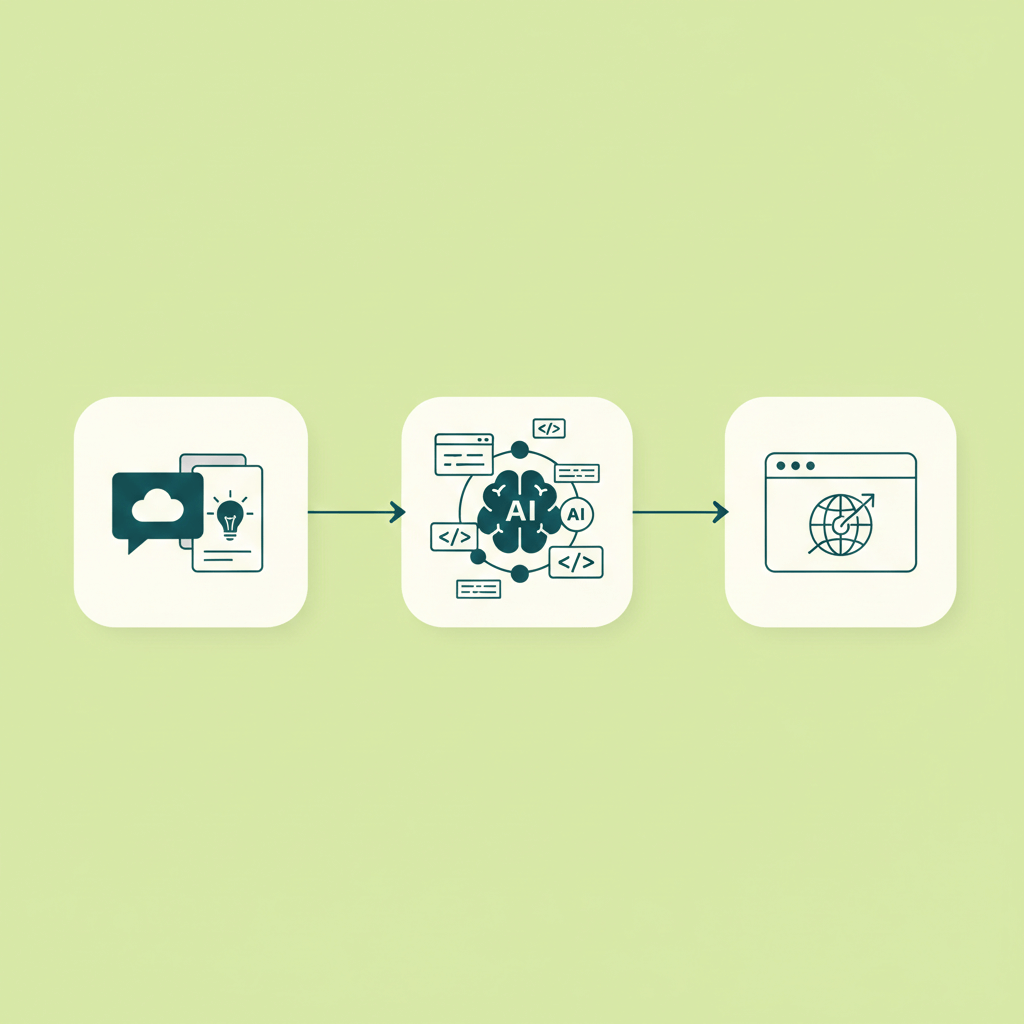
The workflow has three steps. That's not marketing speak; there really are only three.
Step 1: Describe What You Want
You tell the AI what you're trying to build using plain language. Not pseudocode, not technical specs - just the way you'd explain it to a coworker over coffee.
For example:
"I need a system where employees can submit vacation requests. Their manager should be able to approve or reject the request. HR needs to see a dashboard of all requests across the company."
That's a complete prompt. You've described user roles (employees, managers, HR), actions (submit, approve, reject), and views (dashboard) - everything the AI needs to start building.
You can be more detailed if you want - and often, more detail leads to better results - but you don't need to know how databases work or what a REST API is. You just need to know what you want the application to do.
Step 2: Generate the App in Minutes
Once you hit "build" (or whatever the button says), the AI gets to work. And it's doing a lot more than you might think.
In a matter of seconds to minutes, depending on the complexity, the AI:
- Creates the database structure to store your data
- Builds the user interface - the screens people will see and interact with
- Writes the business logic - the rules that govern how the app behaves
- Sets up user authentication - login, roles, permissions
- Configures everything to work together as a complete system
The output isn't a mockup. It's not a prototype that looks nice but doesn't work. It's a real, functioning web app with actual code running behind it.
Step 3: Deploy and Use It
Once the AI generates your application, it's typically ready to use immediately. No setting up servers. No deployment pipelines. No waiting for IT.
Many platforms (including Chattee) handle hosting automatically. You get a URL, you share it with your team, and people can start using it. Some platforms even let you set up custom domains so the app looks like it belongs to your company.
From typing a description to having a working app can literally take minutes.
What Happens Behind the Scenes
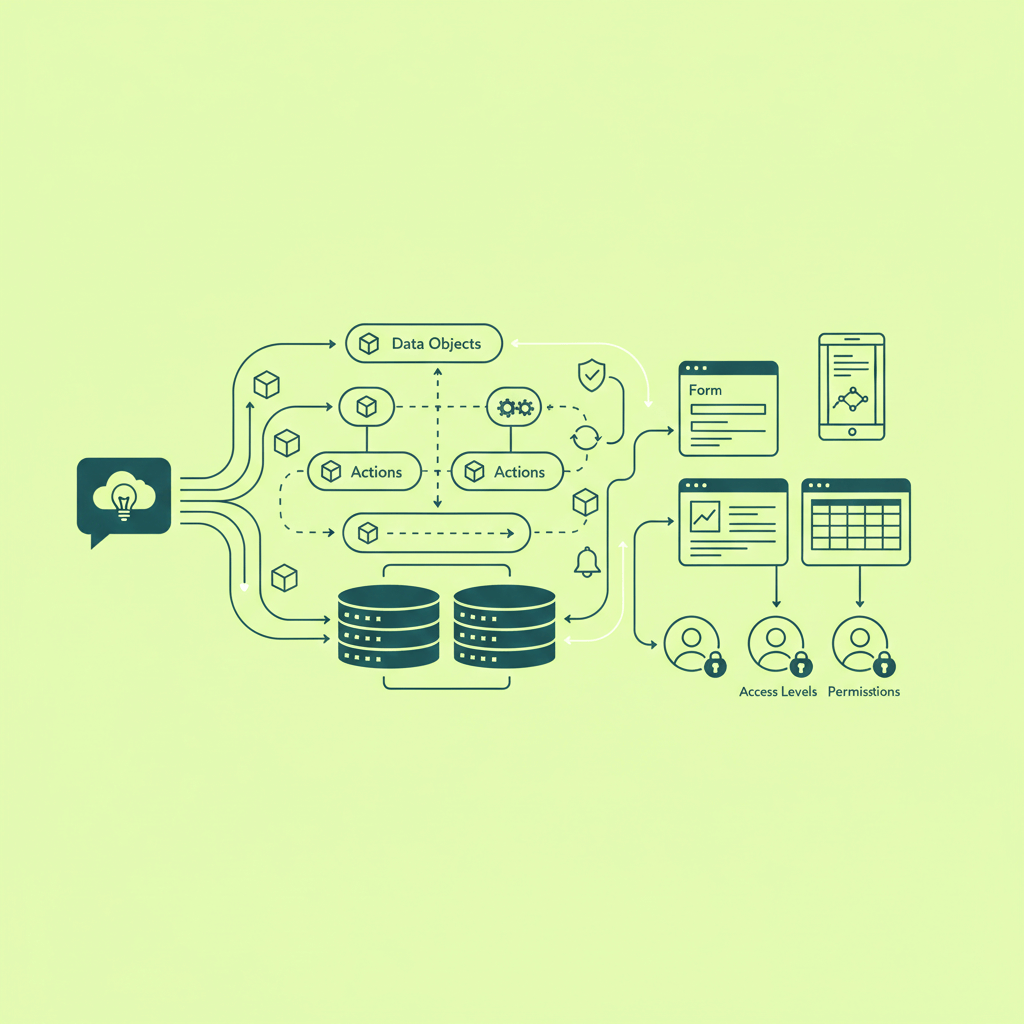
A lot happens in those few seconds between clicking "build" and seeing your application. Here's the rough sequence.
Interpreting Your Requirements
Your description gets parsed for structure. The AI is essentially reading your prompt like an experienced developer would - picking out the important pieces:
Nouns typically become data objects. "Employees," "requests," "managers" - these turn into things the system needs to store and track. Verbs become actions: submit, approve, reject. When you mention that "employees have managers" or "requests belong to employees," those become relationships in the database.
This goes beyond keyword matching. When you write "managers should approve requests from their team," the system infers a hierarchy: "their team" means employees who report to that specific manager, and approval permissions should follow that chain. You never spelled any of that out - it just figured it out from context.
Building the Database
Any app that remembers things needs a database - think of it as a structured filing system, or a spreadsheet with rules about how different sheets connect to each other.
When you mention "vacation requests," the system creates a place to store them and works out what each request needs to include: the employee who submitted it, the dates they want off, a reason, the current status (pending? approved? rejected?), which manager made the decision, and when.
The interesting part is how these pieces connect. None of this data sits in isolation. A request gets linked to the employee who submitted it. That employee gets linked to their manager. The manager is also an employee. All these connections get wired up automatically, so later the app can answer questions like "show me all pending requests from people on Sarah's team."
Creating the User Interface (UI)
Then there's everything people actually see and interact with.
For employees submitting requests, the system generates a form with date pickers, a text field for the reason, and a submit button. For managers reviewing requests, it builds a list or table showing each request with the relevant details and approve/reject buttons right there. HR gets a dashboard - charts showing request volume over time, filters by department, status breakdowns.
Each user type gets navigation that makes sense for their role. An employee doesn't see (or need) the HR analytics panel. A manager doesn't see other managers' teams.
The system also handles the visual details you'd otherwise spend hours on: consistent spacing, readable typography, a coherent color scheme. Nothing groundbreaking aesthetically, but it looks like software built by professionals, not something cobbled together over a weekend.
Business Logic
This is where the actual rules live. When an employee submits a request, it gets saved as "pending" and the right manager gets notified. Managers only see requests from their own reports, not everyone in the company. Clicking "approve" updates the status, deducts from the employee's balance, and fires off a notification. The system won't let someone request vacation during days they've already booked, and it keeps a running tally of remaining days.
All of this becomes real code that executes when people interact with the app. The AI doesn't just know what should happen - it figures out when things should happen and what to validate first.
Who Can Do What
Most business apps need to know who's logged in. The system handles this too: login screens (usually email and password, sometimes Google sign-in), different user roles with different permissions, and access controls that ensure people only see what they're supposed to.
A regular employee logs in and sees their own requests. A manager sees their team. HR sees the whole company. Same application, three different experiences based on who's asking.
All of this - the data structure, interface, logic, and access control - gets worked out at the same time. The AI isn't going through a checklist step by step; it's solving the entire problem holistically. That's how something that would take a development team weeks gets done in minutes.
UI-Only vs Full-Stack: A Critical Difference
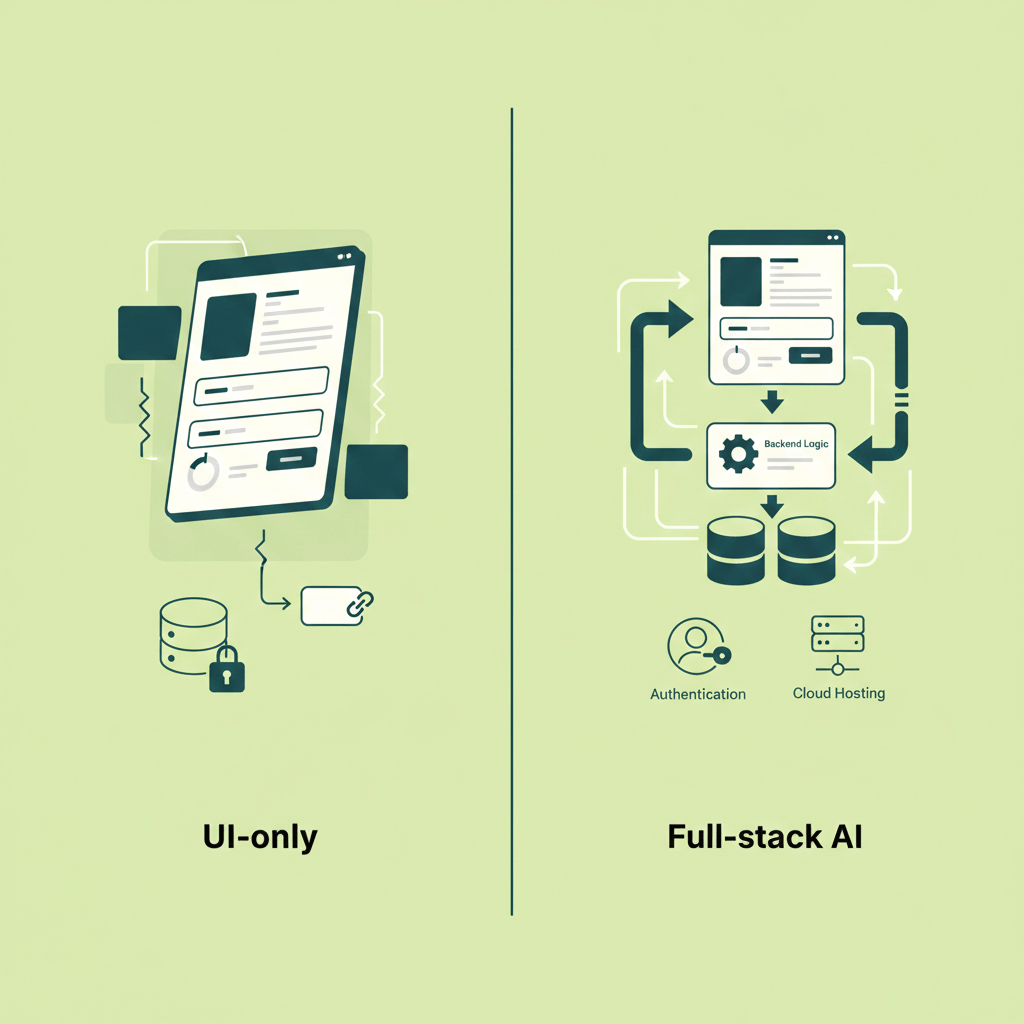
One thing catches people off guard: not all AI app generators create the same thing. Some produce gorgeous interfaces with nothing behind them. Others build complete, working systems. This distinction matters more than most people realize until they've been burned by it.
The Mockup Problem
Certain AI builders are excellent at generating user interfaces - the visual layer. Beautiful forms, clean dashboards, professional typography. But click that "Submit" button and nothing happens. Fill out a form and the data evaporates. It's a movie set: impressive from the front, scaffolding and plywood from behind.
These tools have their place. Need to show stakeholders what something could look like? Perfect. Need to validate a design concept before investing in development? Great for that. But if you need software people can actually use - that saves data, enforces rules, and doesn't forget everything when you close the browser - you need the real thing.
What Full-Stack Actually Means For Apps With AI
Full-stack means everything gets built. The screens (frontend), the logic that processes data and enforces rules (backend), the database that remembers everything, the authentication system, the API that connects all the pieces, and hosting so people can access it.
Here's the breakdown:
- Frontend: what users see and click on
- Backend: the logic that actually makes things happen - validates data, enforces business rules, talks to the database
- Database: where everything gets stored, so data survives between sessions and can be queried later
- Authentication: login, user roles, making sure people can only access what they should
- API: the communication layer between frontend and backend (invisible to users but critical)
- Hosting: servers that run your app and make it accessible via URL
When any of these is missing, you don't have an application. You have a demo.
Why Chattee Goes Full-Stack
Chattee builds complete applications because that's what solves real problems. A vacation tracking system is useless if it can't remember who submitted what. A client portal fails if clients can't actually upload files that persist.
Describe something to Chattee and you get working software - not a mockup you'll need to rebuild later.
Iteration: Nobody Gets It Right the First Time
Expect to refine. The first version of anything - AI-generated or not - is rarely the final version.
Why the First Draft Isn't Perfect
When you describe what you want, you're translating something in your head into words. That translation is lossy. You'll forget to mention things that seem obvious to you. You'll use a term that means something slightly different to the AI.
So the first version will be close, but not quite there.
The approval buttons might be too small. You forgot to mention a field. The dashboard organizes data in a way that made sense to the AI but not to you. None of these are failures. The AI can't read your mind (not yet, anyway), so some back-and-forth is normal.
The Conversation Loop
When something isn't right, you don't file a bug report and wait for a developer to get to it. You just describe the problem:
"The approval buttons are too small on mobile. Make them larger and put them at the bottom of the card."
Or:
"I forgot to mention - employees should be able to upload a doctor's note when requesting sick days. Add a file upload field that only shows for medical leave requests."
Or:
"The dashboard is too cluttered. Can we simplify it to show just three metrics: pending requests, approved this month, and average response time?"
The AI makes the changes. You review. You refine further if needed. Each iteration takes minutes, not days.
Setting Realistic Expectations
Plan for 2-3 rounds of refinement minimum. Not because the AI is bad at its job, but because:
- You'll notice things you want to change once you see them
- You'll realize you forgot to mention requirements
- Your stakeholders will have feedback
- Real-world usage reveals edge cases
The total time for these iterations? Still probably less than a single meeting would have taken in traditional app development.
Making Iteration Work
The key is specificity. "The form feels wrong" doesn't give the AI much to work with. "Make the submit button green instead of blue, and put the date fields side by side instead of stacked" - that's actionable.
Reference things that already exist. "On the manager dashboard, add a column for department" beats "add department information somewhere."
When you have several changes, consider tackling them one at a time. It's easier to verify each fix worked before moving to the next. And if something looks buggy, describe what you're seeing: "When I click approve, I get a blank screen for a second before the list refreshes" gives the AI something to investigate.
Common Misconceptions
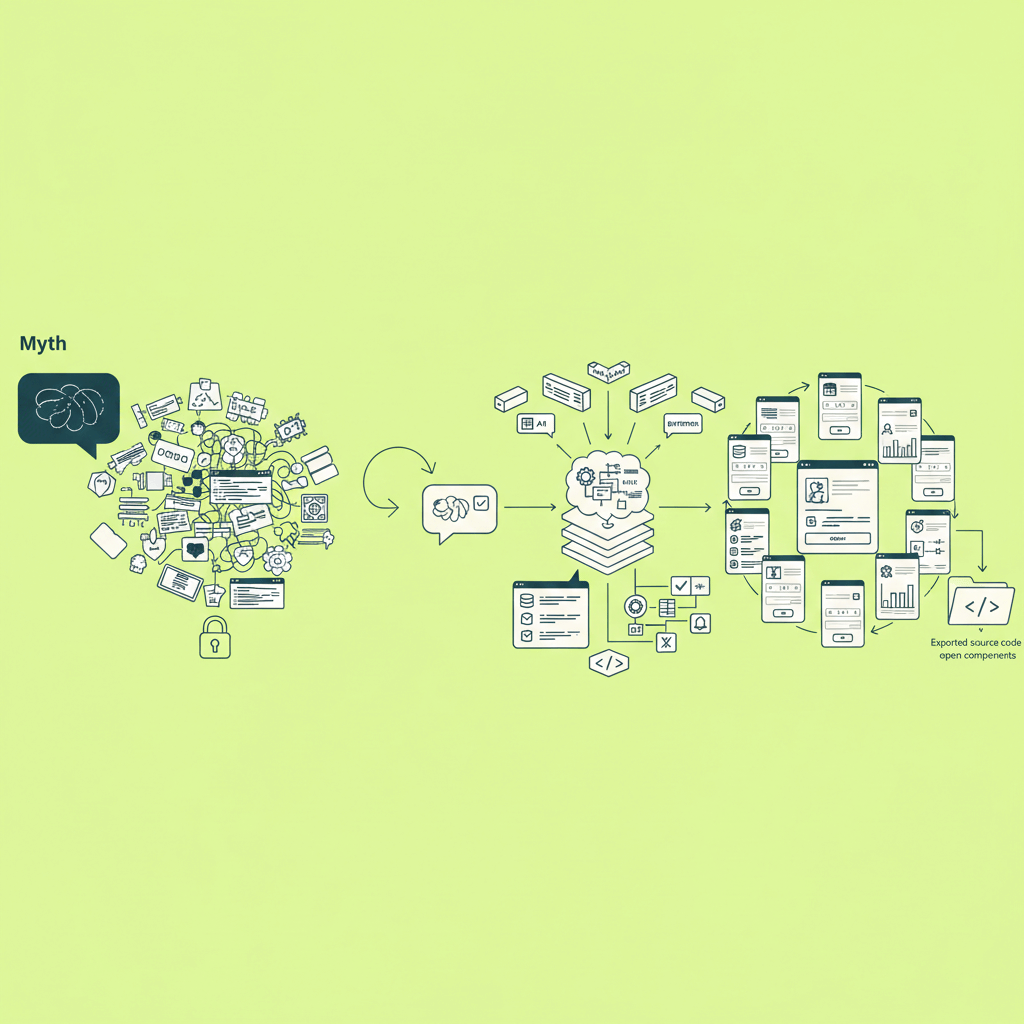
A few persistent beliefs that are worth addressing.
"This must be magic - or a scam." It's neither. The AI has been trained on millions of examples of real software: interfaces, database schemas, business logic, authentication patterns. When you describe what you want, it synthesizes something appropriate from those patterns. Standard business tools fit templates the AI knows well. Unusual, unprecedented applications might need more iteration - but most business software isn't that unusual.
How much does your prompt actually matter? More than you'd think. Compare "build me something for vacation tracking" with "build a vacation request system for a 50-person marketing agency where employees submit requests with dates and reasons, managers approve or reject, and HR sees all requests plus remaining balances - design it like Notion."
The second version gives the AI real constraints to work with. Company size affects permission structure. Mentioning Notion shapes typography and spacing. Detail doesn't guarantee perfection, but it dramatically improves your starting point.
Nobody gets it perfect in one prompt. This is probably the biggest source of frustration for new users. Complex software doesn't emerge fully formed on the first try, regardless of whether humans or AI are building it. People who succeed treat this as a conversation: build something, react to what you see, refine, repeat.
On code quality. Developers tend to assume AI-generated code is a mess. The reality is more nuanced: it follows standard conventions, uses reasonable patterns, handles common edge cases. Not how a senior developer would write it, but clean enough that several Chattee users have shown exported code to their dev teams and gotten better reactions than expected.
You might remember when AI tools could only handle basic forms and lists. That impression stuck, but the ceiling has moved considerably. Current platforms manage multi-role permissions, complex approval chains, conditional logic, calculated fields, API integrations, file handling, and notifications. These days the constraint is usually how well you can describe what you need, not what the AI can build.
What about lock-in? Fair concern. With Chattee, you can export the complete source code whenever you want - frontend, backend, database schemas, all of it. Standard technologies, no proprietary dependencies. If you eventually want to move to your own infrastructure, the code is yours.
A Real Example: Building a Vacation Request System
Theory is fine, but let's walk through an actual build. Here's a vacation request system, from initial prompt through several rounds of refinement.
The Starting Prompt
"Build an employee vacation request system for a company of about 100 people. There are three user types: regular employees, managers, and HR admins.
Employees can submit vacation requests with start date, end date, type (vacation, sick leave, personal day), and an optional note. They can see all their past requests and their current vacation balance.
Managers see requests from employees who report to them. They can approve or reject each request with an optional comment. They should also see a calendar view showing who on their team is out on any given day.
HR admins see everything: all requests across the company, a dashboard with metrics (total days requested this quarter, approval rates, etc.), and the ability to adjust anyone's vacation balance.
The design should be clean and professional - think modern SaaS tool. Blue color scheme. Mobile-friendly since people will check this on their phones."
What Comes Back
A few minutes later, there's a working application. The database has tables for users (with their roles), vacation requests (with status, dates, type, notes), the reporting relationships between employees and managers, and vacation balances.
The interface includes a login page, an employee dashboard where people can submit requests and see their history, a manager view with a queue of pending requests and a team calendar, and an HR admin panel with company-wide metrics. There's also a profile settings page.
The business logic is wired up: requests get validated (end date has to be after start date, can't exceed your balance), the approval workflow updates statuses correctly, approvals automatically deduct from balances, and notification hooks are in place (though we'll configure where those actually go in a later step).
Authentication works too - secure login, role-based access so employees can't stumble into manager views, session management so people stay logged in.
The Calendar Blind Spot
Testing reveals an issue. The team calendar only shows approved time off - not pending requests. But managers need to see pending requests when deciding whether to approve. Otherwise you end up greenlighting three people for the same week.
"On the manager's team calendar, show pending requests as well as approved ones. Use a different color - yellow for pending, green for approved."
Two minutes later, managers can see the full picture before deciding.
Adding Notifications
The system works, but nobody wants to refresh the app all day wondering if their vacation got approved.
"Add email notifications: when an employee submits a request, email their manager. When a manager approves or rejects, email the employee. Weekly summary to HR. Keep emails simple and professional."
The system creates an email service, designs templates, and wires everything to the right triggers.
Polish Based on Feedback
Once a few people start using it, the small stuff surfaces:
"The submit button should say 'Submit Request' not just 'Submit'. Add a confirmation modal before rejecting - we don't want accidental rejections. On mobile, make the request form single-column. Show remaining balance prominently at the top of the employee dashboard."
Each of these takes seconds to fix.
Where We Ended Up
The final system handles the full workflow from request to approval, shows each user role the right view, sends email notifications, looks professional on desktop and mobile, and actually works - data persists, rules are enforced, nothing breaks when you refresh.
Total time including all the iteration: probably under two hours. The same system built traditionally would have taken weeks and cost thousands of dollars.
What Actually Works
After watching thousands of builds, some patterns consistently lead to better results.
Be specific about who uses it. Don't just say "users." Spell out the different roles and what each one needs: "Employees can view their own requests and submit new ones. Managers do everything employees can, plus approve requests from their direct reports. HR sees everything and can adjust anyone's balance."
Describe workflows, not just features. "Add approval functionality" is vague. This is better: "When an employee submits a request, it goes to their manager's queue as pending. The manager approves or rejects. Approval deducts from the balance automatically. Rejection requires a reason. Either way, the employee gets notified."
Give design direction. The AI can match different aesthetics, but you need to point it somewhere. "Clean and minimal" produces something different from "professional and corporate like Microsoft 365" or "modern and friendly like Notion." If there's an app whose look you admire, mention it by name.
Say what you don't want. Sometimes this matters as much as what you do want. "Don't add features I haven't mentioned." "No public pages - everything requires login." "Skip integrations for now." This keeps the AI from helpfully adding complexity you'll have to remove later.
Build up, don't strip down. Start with core functionality and add from there. First prompt: basic structure and main workflow. Second: refine based on what you see. Third: add secondary features. Fourth: polish and edge cases. This catches problems early, before they compound.
Give It a Shot
Reading about this only gets you so far. The process makes more sense once you've watched an application emerge from your own description.
Think about something you've needed for a while. That internal workflow still stuck in spreadsheets. The client portal that keeps getting bumped down the priority list. The tracking system your team has mentioned a dozen times but nobody's had time to build.
Chattee is free to start - no credit card, no commitment. Describe what you want and see what happens. The first version won't be perfect (it never is), but you'll have a working application you can refine from there.
Curious about the broader shift happening in software development? Our guide on What is Vibe Coding? covers the movement making AI-assisted development mainstream.